The Give It All trend · one photo · eleven seconds
Give It All AI video from one photo
A Give It All AI video puts you at the hanging mic of BigXthaPlug's From The Block performance: the cinema lobby, the crowd behind you, one unbroken take — with the hook off the record, not a soundalike.
An unofficial AI parody. Not affiliated with BigXthaPlug, From The Block, TikTok or CapCut, and no original footage or faces end up in your video.
11 seconds · 720×1280 · 9:16 · original sound
Make your Give It All video
One photo, waist up or closer. No prompt to write, no model to pick, no editing app.
That did not go through
One real render · 11 seconds
A real output from this pipeline, left uncut: one photo in, the same camera move and the original hook out. The face here is AI-generated, not a customer.
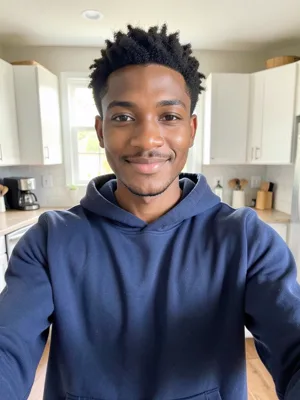
What went in: one selfie.
What the Give It All trend actually is
BigXthaPlug released "Give It All" on 30 October 2026, on the album Better Over Time. The version the trend copies is not the studio cut: it is his From The Block performance, a series where an artist performs one take at a single hanging vintage microphone with the crowd pressed in around them. This one was filmed in a cinema lobby, under the orange showtime boards.
The performance was posted on 3 November 2026 and spread on TikTok within days; one reupload passed 350,000 views with 51,800 likes by 6 November. By 14 November #bigxthaplug carried 87,623 videos and 1.7 billion views, and #fromtheblockperformance 1,471 videos and 107 million views.
The AI version appeared in early November, when the first tutorials showed how to put your own photo at that microphone. Three days later AI video sites had turned it into a template. People search for the result under several names — give it all ai, give it all to me ai (the hook is easy to mishear that way), bigxthaplug give it all ai, or simply the give it all trend.
Where to check all of this: BigXthaPlug: GIVE IT ALL (Official Visualizer) · BigXthaPlug: GIVE IT ALL (official audio, Better Over Time)
One take, eleven seconds
One framing, eleven seconds, no punch-ins: the performance is a single take, so the clip follows it from the first bar to the end of the line. This table is the renderer's spec — if a render comes back different, the table is the bug report.
| Time | Shot | What happens |
|---|---|---|
| 0–11s | One take | You at the hanging mic from the first bar: hands working, laughing into the line, the crowd packed in behind and the chrome mic swinging beside your face. |
Audio: the hook from the performance, same take — a quarter-second fade in, and the clip ends where the line ends rather than inside it.
How to make a Give It All AI video
Three steps, one upload slot, no timeline. The lobby, the crowd and the microphone are already in the renderer.
- 01
Upload one photo
Waist up or closer, one adult, face to the lens. There is no prompt to write and no model to pick; the scene is fixed.
- 02
Pay once and wait
One payment, shown on the button before you pay. The render takes a few minutes, and there is no account to create and no credits to buy.
- 03
Download and post
You get the 11-second vertical MP4 with the hook, plus a silent copy, on a private link. Keep the AI label on when you post it.
The photo that works
In a Give It All AI video the first five seconds are a close-up, so the photo does most of the work. These five things decide whether the face holds for the whole clip.
- Face forward, eyes open, nothing covering them. The close-up is the whole first shot.
- Waist up or closer. A full-length shot from across a room leaves too few pixels on the face.
- Even light on both cheeks. A hard shadow on one side is the most common reason a face drifts.
- One adult who agreed to appear. No children, no celebrities, nobody from the original video.
- Wear what you would wear on stage: a jacket, a chain or a cap in the photo carries into the clip.
What comes back as a failed render
- A dark selfie, or a face turned away from the lens.
- Two people in frame — we stop you before payment, because the renderer needs exactly one face.
- A screenshot of a screenshot: heavy compression reads as a different face.
Give It All AI video vs a CapCut template
A Give It All AI video and a CapCut template both end up on TikTok. They are not the same job, and the difference shows in what you have to do before you post.
| This page | A CapCut template | |
|---|---|---|
| The sound | The 11-second hook from the performance, cut clean. | The template's audio, if the template ships it. |
| The shots | One continuous take, cut to the length of the line. | You match your clip to the template's beats by hand. |
| What you supply | One photo. | Video of yourself, or a set of photos you cut to length. |
| Editing | None. No timeline, no keyframes, no export settings. | Trim, align, export — and redo it when the timing drifts. |
| What it costs | One payment per video, shown on the button before you pay. | Free, minus the time and the watermark on some assets. |
Give It All AI questions
Is the real song in my video?
Yes — eleven seconds of the hook from the From The Block performance. No profanity, but one line mentions marijuana, so treat it as a clean-ish cut rather than a family-safe one. Everything you see is new: the lobby, the crowd and the performance are generated around your photo, with no footage of the rapper in it.
Why do people call it give it all to me AI?
Because the hook repeats "just give it all to me", and most people hear the line long before they learn the title. give it all to me AI and give it all AI lead to the same video: one photo, the hanging mic, eleven seconds of that hook.
Will I look like BigXthaPlug?
No. The performer keeps your face, hair, build and clothes from the photo. Only the setting, the camera moves and the sound follow the performance — a cap, a chain or a jacket shows up only if it is in your photo.
Do I have to rap or record anything?
No. One photo is the whole input. The mouth and the hands are animated against the hook, which is why the render takes minutes rather than a shoot.
Is it real footage of me?
No. Every frame is generated from a still photo, and the lobby, the crowd and the microphone are made up. Keep the AI label on when you post it, and only upload adults who agreed to appear.
What exactly do I get, and when?
An 11-second vertical MP4 at 720×1280 with the hook, plus a silent copy, on a private link that works for {days} days. It usually lands within 10–15 minutes of payment and there is no account to create.
Does it work on a phone?
Yes. The upload, the payment and the download all run in the phone browser — nothing to install. The file is vertical 9:16, so it goes straight into TikTok, Reels or Shorts.
Do I need CapCut or an editor?
No. There is no timeline, no template to import and no export setting to choose; the MP4 arrives finished. The only decision left is whether to post the version with the hook or the silent copy.
Is there a free version?
No. Every render costs us money, so there is no free tier and no trial. A CapCut template is the free route — you shoot the footage, match the beats and lip-sync it yourself — which is what the comparison above is about.
Can my dog or cat do it?
Not on this page yet. The pet version is a separate render — a different cast pass and a different photo check — and it ships after the human one, not with it.
Will TikTok or Instagram mute it?
The hook we cut has no profanity, but one line mentions marijuana, and a platform can still limit a track for its own licensing or content reasons. If that happens, post the silent copy with the sound added in the app.
What if the render fails, or I do not like it?
A failed render is refunded in full automatically — no request needed, usually within 5–10 business days. A delivered video you simply do not like is not a failure: email us with the order number and we will redo it or refund it.
Can I post it, and can I use it commercially?
You can post it and use it commercially under the terms. The performance belongs to its owners, so do not present the clip as official BigXthaPlug or From The Block material, and do not sell it as a template of theirs.
Can I put someone else in it, or a celebrity?
Someone else, only with their permission and only if they are an adult. Celebrities and public figures are refused: the page and the terms both prohibit it, and photos are checked for exactly one face before any render starts.
How is this different from the Tiny Desk video on this site?
The Tiny Desk clip is 17 seconds, four shots and up to five people, with the original record. This one is 11 seconds, one take, one person and one hook — a different renderer, a different cut and a lower price.
Updated November 18, 2026
The Give It All trend · one photo · eleven seconds
One photo at the hanging mic
Eleven seconds, one take, the hook — and no editing app in between.